> ## Documentation Index
> Fetch the complete documentation index at: https://docs.extend.app/llms.txt
> Use this file to discover all available pages before exploring further.
# Bounding Boxes & Citations
> How to leverage bounding box and citation references when reviewing documents in Extend.
Extend provides references to locate extracted data within your documents. The specific format and availability depend on your processor's configuration type: JSON Schema (recommended) or Fields Array (legacy).
While traditional OCR products often include bounding boxes, Extend uses a mix of multimodal large language models and traditional vision models. Due to this mixture, providing references isn't always possible, and coverage for all fields isn't guaranteed, even when enabled. However, we are always working to improve coverage.
These references are currently only available for `Extract` output fields and are supported for the following file/document types:
* `PDF`
* `IMG` (jpeg, png, etc)
## Citations (JSON Schema Config)
This section is relevant for processors using the **JSON Schema** config type.
If you are using the legacy Fields Array config type, please see the [Bounding
Boxes (Legacy Fields Array
Config)](#bounding-boxes-legacy-fields-array-config) section. If you aren't
sure which config type you are using, please see the [Migrating to JSON
Schema](/product-reference/studio/migrating_to_json_schema) documentation.
For processors configured with JSON Schema, Extend uses **Citations**. Citations provide a polygon reference to a specific location in the document.
**Key Points:**
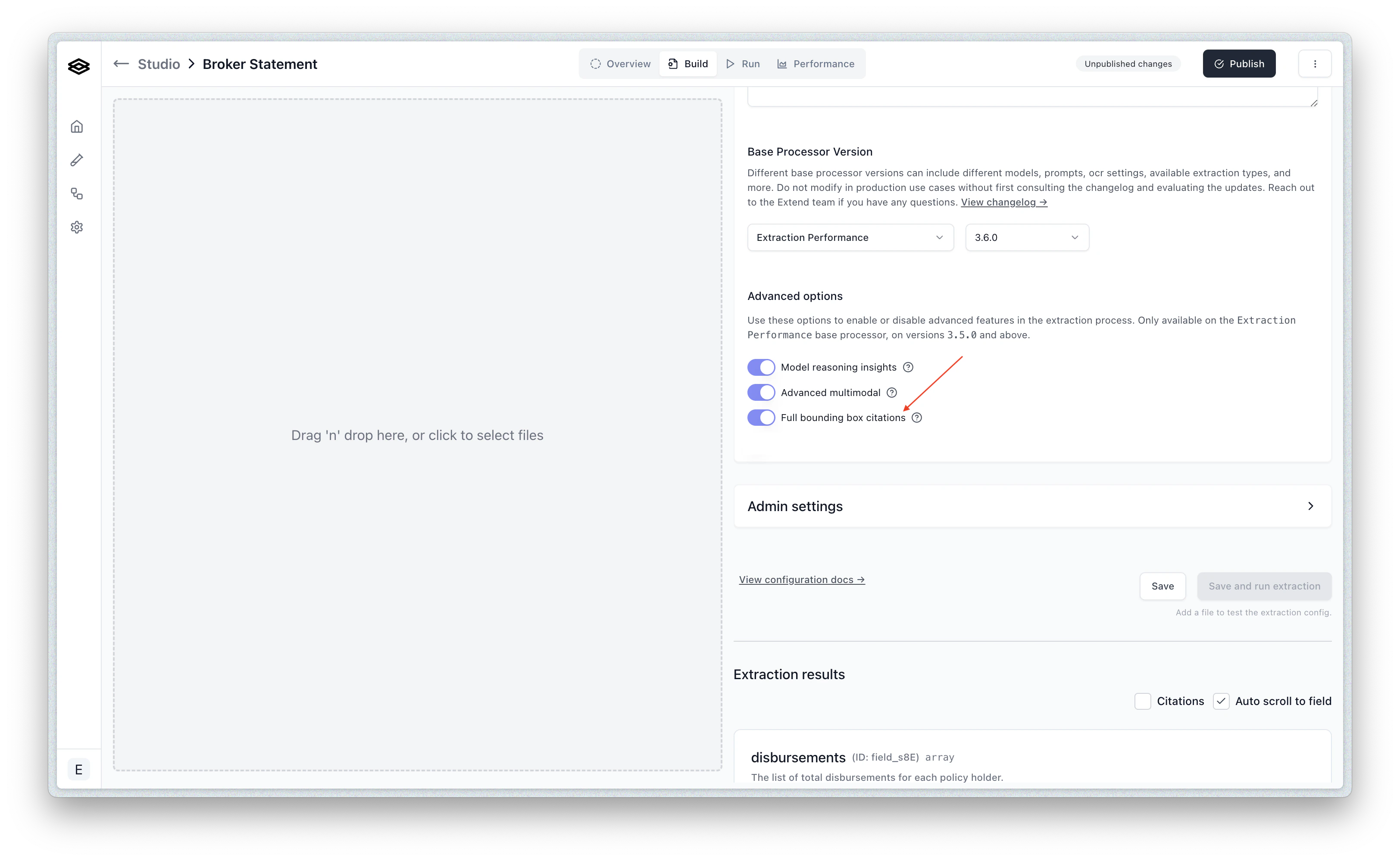
* **Availability:** Citations are returned in the `metadata` object for each field **only if** the `includeBoundingBoxCitations` option is enabled in the processor config. You can enable this in the Studio via the Build tab under "Advanced options".
* **Field Type Coverage:** When enabled, Citations can potentially be returned for **all field types**.
* **Schema:** Citations use a `polygon` structure representing points on the page. For detailed schema information and usage examples, see the [API Reference](/api-reference/guides/bounding_boxes#citation-schema).
## Bounding Boxes (Legacy Fields Array Config)
This section is relevant for processors using the legacy **Fields Array**
config type. If you are using the recommended JSON Schema config type, please
see the [Citations (JSON Schema Config)](#citations-json-schema-config)
section.
For processors using the older Fields Array configuration, Extend provides **Bounding Boxes**.
### Default Bounding Boxes
The default bounding box feature uses heuristic-based matches and supports the following field types:
* `date` fields
* `string` fields
* `signature` fields
* `array` fields (on nested string fields)
* `object` fields (on nested string fields)
### Advanced Bounding Boxes
If you have selected "Advanced bounding box" in the extraction settings in the Extend Studio, bounding boxes can be provided for additional field types with potentially higher coverage:
* `enum` fields
* `number` fields
* `boolean` fields
* `null` fields - If a field is declaratively null (e.g., an empty form input), a bounding box reference may be returned. If there is no declarative indication of null, bounding boxes will not be returned.
You can toggle this on in the Advanced Settings of an extraction configuration in Extend Studio:
 * **Schema:** Bounding Boxes use a `left`, `top`, `right`, `bottom` structure. For detailed schema information and usage examples, see the [API Reference](/api-reference/guides/bounding_boxes#bounding-box-schema).